Overlay stuck or not updating
When using TIKTORY overlays in OBS Studio, you may occasionally encounter situations where the browser source freezes and stops responding. This guide explains how to quickly refresh the overlay and get back to streaming.
The Problem
OBS Studio uses an embedded Chromium browser to render web-based overlays. While generally stable, this browser can occasionally freeze due to memory issues, JavaScript errors, or long streaming sessions.
Symptoms
- Overlay elements stop updating (e.g., alerts don’t appear, counters don’t change)
- The overlay displays but appears completely frozen
- New events from your live stream are not reflected on screen
- The overlay may show a static snapshot of its last working state
Solution: Refresh Browser Source Cache
OBS provides a built-in way to refresh browser sources without removing them from your scene:
- Right-click on your TIKTORY browser source in the Sources panel
- Select Properties to open the source settings
- Scroll down to the bottom of the properties window
- Click the Refresh cache of current page button
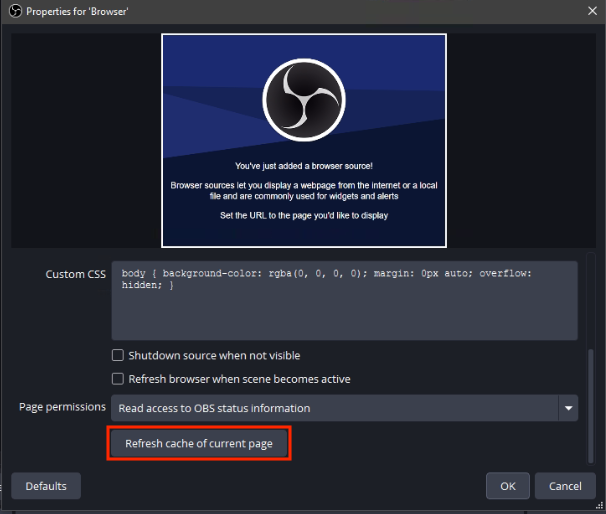
The overlay will reload and should resume working normally.
Quick Access via Hotkey
For faster access during live streams, you can set up a hotkey:
- Go to Settings → Hotkeys
- Find your browser source in the list
- Assign a hotkey to Refresh cache of current page
Now you can refresh the overlay instantly with a single key press.
When to Use Each Method
| Situation | Recommended Action |
|---|---|
| Overlay frozen during stream | Use hotkey (if configured) or Refresh cache button |
| Overlay showing old/cached content | Refresh cache of current page |
| Overlay completely unresponsive | Remove and re-add the browser source |
| Issues persist after refresh | Restart OBS Studio |
Prevention Tips
- Keep OBS Studio updated to the latest version
- Avoid extremely long streaming sessions without occasional restarts
- Ensure your system has adequate RAM available
- Consider setting up the refresh hotkey for quick recovery during streams
Summary
OBS makes it easy to recover from frozen browser sources with the Refresh cache of current page button in the browser source properties. For the fastest response during live streams, configure a hotkey for instant refresh access.
Was this article helpful?